









home clear 64x64
  1. MONITORING
en blue 200x116 de orange 200x116
  • News
    • News about
    • Articles archive
    • Search
    • Login registration
  • Informix
  • Services
  • Monitoring & Tools
Open menu
  • News
    • News about
    • Articles archive
    • Search
    • Login registration
  • Informix
    • Informix Editions
      • Informix Innovator-C
      • Informix Express
      • Informix Developer
      • Informix Workgroup
      • Informix Enterprise
      • Advanced Developer
      • Advanced Workgroup
      • Advanced Enterprise
    • License texts
      • Informix Enterprise
      • Informix Workgroup
      • Informix Express
      • Informix Innovator-C
      • Informix Developer
      • Advanced Developer
      • Advanced Enterprise
    • Informix Announcements
  • Services
    • Feature requests
    • Documentation
      • Informix docu 14.10
      • Informix docu 12.10
      • Informix docu 11.70
      • Informix docu 11.50
      • IBM Informix Redbooks
    • Newsletter (IBM)
    • References
    • Bugs - research
      • Bug search - how to use
    • Bugs - newest
    • Bugs - fixlists
    • Workshops
    • Lifecycle (EOS)
    • Machine notes
    • Release notes
    • Media download
  • Monitoring & Tools
    • Demo session
    • Developers blog
    • Guided tour
    • Monitoring Informix
    • Release informations
    • Additional services
    • Download updates
     

Erik Stahlhut

CURSOR Expert Solutions

We have reorganized our service and support offerings for our database business and consolidated them into CURSOR Expert Solutions GmbH (XPS).

We are continuing our existing offerings seamlessly through XPS while also intensifying the further development of CURSOR Admin-Scout.

Our entire service portfolio will be provided through XPS in the future. As a subsidiary, we remain part of the CURSOR Software AG group in Giessen.

Our contact details remain unchanged – just get in touch with us.

 
  • All Informix service and support offerings are now available through CURSOR Expert Solutions
  • XPS Data Suite for Informix – 12-month subscription, integrated DBMS included
  • Informix Monitoring and Support—with the Informix experts of CURSOR Expert Solutions
XPS Data Suite
XPS Data Suite
Admin-Scout
XPS Admin-Scout
Service & Support
Service & Support
About Our Company
About Our Company
invispix 10x10

Written on 2026-06-23

Admin-Scout 4.1
Development and Release Steps

All changes up to Release 4.1
of May 2026

yellow gear 1200x400 02

Read more

Written on 2026-03-31

The Informix Newsletter 2026/Q2:Informix Newsletter is a spark plug

Highlights of the Issue:
  • TechTipp: ONCONFIG - DUMPSHMEM
  • TechTipp: Funktionen even() / odd()
  • TechTipp: SHM-Listener unter Ubuntu
  • TechTipp: Version 15.0.1.4 ist verfügbar
  • ...

Read the whole article and view the Informix Newsletter online here!

Read more

Written on 2025-04-07

Informix Feature RequestIBM Informix Feature Request

Vote now for an upgrade of the editions!

The limitations of the smaller Informix editions have long been outdated and an obstacle to the future-oriented use of Informix. As part of Informix Technology Days 2024, a call was made to product management to review and upgrade the limits. There has been no response from IBM to date.

You can also support this feature request!

Read more

Written on 2025-02-24

Technology Days 2025IBM Informix Tage 2019

IBM TechXchange: Informix Technology Days 2025
on March 12th/13th, 2025, at IBM Watson Center in Munich.

Informix Technology Days 2025: like last year, at the same place but one day earlier and one major release further! Two days of lectures and hands-on labs with discussions about IBM Informix.

Read more

Written on 2025-01-24

Obituary - Carlton Doe

We were saddened to have heard of Carlton Doe's death.

Carlton came to IT in the 1980s. He began working with the Informix database as a 4GL developer, administrator and consultant. His high technical understanding, communication skills, and passion for advancing projects, made him a globally recognized expert on Informix over the course of his professional life.

Read more

Written on 2024-07-31

Admin-Scout 4.0
Development and Release Steps

All changes up to Release 4.0
of August 2024

yellow gear 1200x400 02 

Read more

Written on 2024-07-04

NSI changes to CURSOR XPSErik Stahlhut

We have combined our service and support capabilities for high-performance databases with the system-oriented tool development of Nonne & Schneider.

Read more

Written on 2024-02-19

Informix Technology Days 2024IBM Informix Tage 2019

IBM TechXchange:
Informix Technology Days 2024 - on March 13th/14th, 2024 at the IBM Watson IoT Center in Munich.

After a pause caused by the Corona pandemic, we are pleased that IBM is offering the Informix Technology Days at the Watson Center in Munich again this year. The planned event is, as in previous years, aimed at decision-makers, developers, and system technicians who work with the database system in their professional daily life. IBM expressly invites all Informix users - including those who may have a potential interest in the technology - to join us.

Read more

Written on 2022-11-27

Admin-Scout 3.3
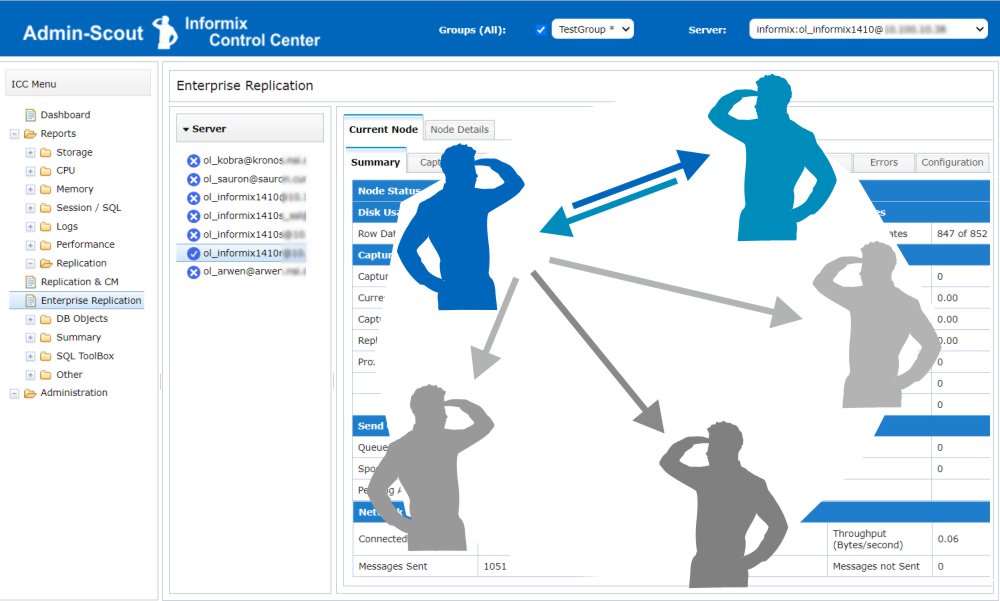
Informix Enterprise Replication Module

Informix ERInformix Enterprise Replication is a powerful way to replicate data assets across distributed installations and keep them consistent.
With version 3.3, Admin-Scout helps Informix administrators to set up, configure and monitor Informix Enterprise Replications.

This article provides an overview of Informix Enterprise Replication with our Admin-Scout for Informix.

Read more

Written on 2021-11-21

Admin-Scout 3.2
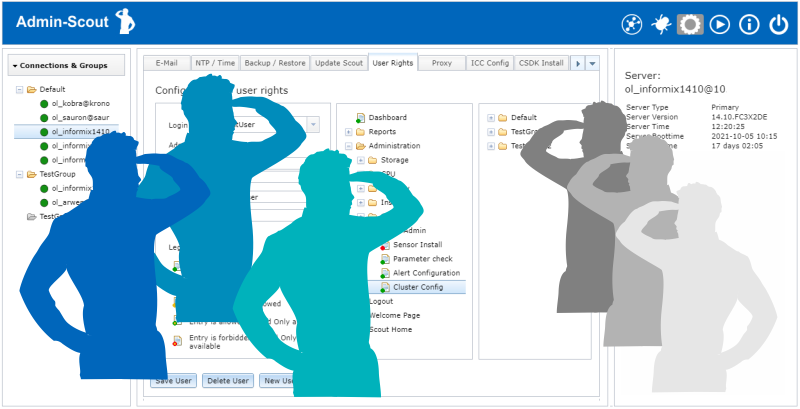
Create individual users / Test roles with the SQL-Editor

Informix compareCustomized use of the Admin-Scout thanks to the new role concept
Whereas Admin-Scout previously only knew the default users "cursoradmin" and "openadmin", the new version 3.2 allows the creation of individual users. In combination with a dedicated assignment of rights on menu level, different roles can now be built up specifically.

Checking role and rights concepts with the SQL-Editor

Administrators have to deal with roles and access rights of database users. To make it possible to check the rights of a user, the new version allows to test accesses of the SQL-Editor under a different user name

Read more

Written on 2021-10-25

Admin-Scout 3.2
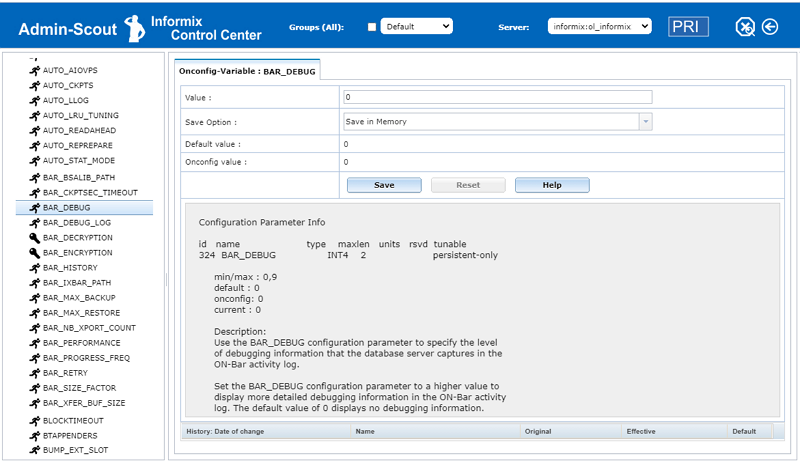
ONCONFIG Explorer

Informix compareWith the ONCONFIG Explorer, Admin-Scout 3.2 offers a completely new module for managing ONCONFIG variables.
The goal of our development was to clearly summarize the ONCONFIG variables in one place and to present all information related to selected variables.

The ONCONFIG Explorer displays all ONCONFIG variables alphabetically sorted in a tree structure. A search field can be used to narrow down the number of hits.

For all documented variables a help button supports the quick display of the reference entry from the manual.

Read more

Written on 2021-10-25

Admin-Scout 3.2
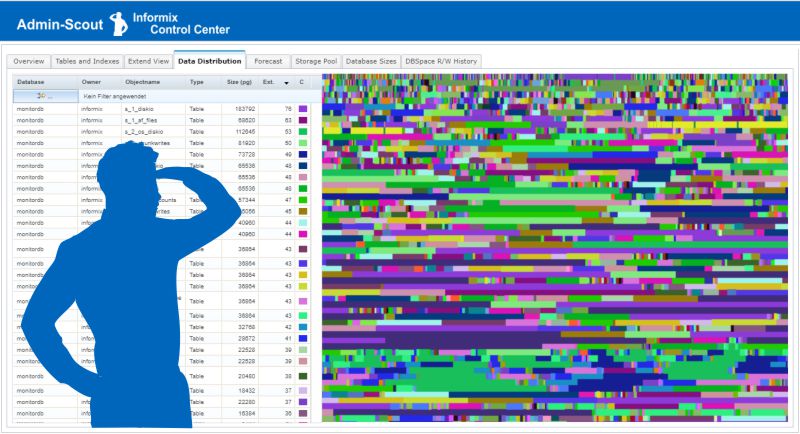
New Storage Module

Informix compareThe entire storage administration clearly arranged in one module!

Admin-Scout 3.2 offers a complete overhaul and restructuring of storage management. The new module combines storage administration and reporting in one menu item. Administrators are now able to see all storage objects immediately through a hierarchically sorted object tree. A simple click provides all relevant details, sensibly organized via individual tabs.

Read more

Admin-Scout - Request a guided tour

Admin-Scout - Request a guided tour

Invest 45 minutes and get to know the admin scout in a guided tour.

We show you the Admin-Scout live in a real application environment.
Ask for a guided tour and become familiar with the Admin-Scout in a simple way.

Tour 1 – Scout Basics

The Admin-Scout is much more than a tool for administration and monitoring. In the Tour Scout Basics we present the essential components and their interaction. The Admin-Scout Dashboard bundles all important information for the daily administration and is at the same time the entrance to further detailed analysis. We show you how you can receive meaningful status reports on a daily basis and what benefits you can derive from the Admin-Scout.

Tour 2 – Administration Inside

This tour is for the experienced Informix Administrator. Administration Inside deals in more detail with the contents of administration, monitoring and alerting. The configuration of service levels, sensors and thresholds is just as much a part of the tour as detailed reporting with drill-down functions. The evaluations for DBSpaces, DB-Objects, parameters and memory management are examined more closely.

Tour 3 – Performance Special

This tour focuses on performance. Bottlenecks in the configuration of important parameters, the DBSpaces and Chunks, are addressed and relevant statistics for I/O, Waits, Checkpoints etc. are explained. The SQL trace is used to analyze slow and resource-intensive SQL statements. We will also discuss the index structures, sequential scans and additional tuning options.

Arrange a guided tour? Just send us a request here!

Please select your prefered tour(s):
Get to know the Admin Scout
Questions and suggestions, we call you back
Contact data
19 * 11 =

Your consent within the framework of the European GDPR!

By sending this request, you consent to the use and processing of the data provided for contact purposes.
You can find further information in our privacy information.

Terms of service *


Notices:
  • All tours are planned for approx. 45 minutes.
  • Tour 2 and Tour 3 require Tour 1.
  • A TeamViewer or WebEx session is required for participation.
  • Your entries in our form will only be used in connection with the provision of information material or customer care. They will not be used for other purposes, accessed by third parties or passed on to third parties.

The Admin-Scout for Informix

A separate server for monitoring, administration and tuning of Informix databases

Easy

Reliable

Profitable

Managed services

  • fully installed
  • analyze
  • optimize
  • administrate
  • system administration
  • additional sensors
  • automated surveilance
  • selective alert (24x7)
  • minimize downtimes
  • simplify maintenance
  • take the load of administrators
  • Managed services model
  • monthly terminatable
  • additional services available
  • cheaper than a man-day per year

Support for Informix Administrators

You are an administrator and responsible for the availability of your company’s database? 
Your support means to be on standby around the clock with short reaction times and high pressure in the case of a problem?

Look ahead and simplify the administration of your IBM Informix data base systems. Reduce the effort with automatized monitoring and alarming.
Get direct an overview of the important performance parameters of your system. Use the Admin-Scout Dashboard for a quick overview and the drill-down function for the details.

Optimize the performance and response times of your applications. Analyse the performance over daily or weekly periods. Switch on the SQL trace to find time-intensive statements.

Focus on the essentials and use the Admin-Scout for automated monitoring. The alarm system of the Admin-Scout is finely configurable and reports alarms priority-controlled. Stay undisturbed by trivialities and recognize immediately if it really burns.


Informationen auf AnfrageOur best practice toolbox relieves administrators in their daily work:


  • Easiest way to start with Informix administration
  • access to all Informix instances in the corporate network
  • configuration and administration via a central tool
  • automation, monitoring, prioritized alarming
  • dashboards and meaningful reporting
  • bottleneck analysis, evaluation of performance data with detailed diagrams
  • automation of tasks (task scheduling)
  • combined database and system monitoring
  • Best practice plug-ins from CURSOR Informix Support
  • Informix service and support up to 24x7 additionally on top

We will be pleased to send you further information.
Ask for our low-rent conditions.
Take the chance to test the Admin-Scout for one month free.

infos zusenden de blue 1683x100


Admin-Scout - additional Services for Informix

Admin-Scout - additional Services for Informix

i blue 60x60Scout-Starter and Scout-Trainer are service packages for the quick start and optimum use of the Admin-Scout in your system environment.



With Scout-Admin and Scout-Ultimate, our support staff will take on specific tasks in your Informix administration. About the Admin Scout, our employees are right at the pulse of your database systems. We offer a coordinated monitoring and the execution of administrative tasks, up to the 24x7 support readiness.

Admin-Scout download Updates

Admin-Scout - Download Updates & Images

Installation of Updates
  • Go to the menu: "Backup / Restore und Update"
  • choose "Admin-Scout-Update" and choose your update file from here. After this click on "Upload Update"
  • Is the upload finished, you see your file and the size of the file.
  • Click on "Update" and wait on the success-message.

After this update you must update the Open-Admin plugin. Go to the Open-Admin-Tool under Admin to the "Plugin-Manager" menu entry. You can see the "CURSOR-Scout-Plugin" with a Update button after. Click on 'Update' and wait for finish.

After this you must check every configured instanz for new versions of the task or sensor's. Go for every instanz to the menu entry "Install Sensors" under "Scout Settings" and check the updates.

ATTENTION: for the update to version 3.0.0 the package sqlite3 must be installed.

ATTENTION: for the update to version 3.1.0 the package shellinabox must be installed (apt-get install shellinabox).

Updates are only available to registered Admin-Scout customers - please log in first

Admin-Scout - start a demo session

Admin-Scout for Informix - start your demo session Start

Dear Visitor,

the Admin-Scout demo session runs within a VM on an Informix Innovator-C database.

You can test all features of the Admin-Scout (Informix Control Center).

However, you have no access to the items Configuration, Time Settings and Backup/Restore. Here we offer slide shows for an overview.

The following tools are available:
   
backup blue 96x96ICC Informix
Control Center
clockblue 96x96 Time setting / Service status (Slides)
gear blue 96x96 Configuration of the Admin-Scout (Slides)
backup blue 96x96 Backup / Restore and Update (Slides)
Installed Version:
Admin-Scout 4.0 / August 2024
info blue 96x96 Help for the Admin-Scout
(english version) - (Hilfe auf Deutsch)

© 2016 - 2026 Copyright CURSOR Expert Solutions GmbH, 35398 Gießen, Friedrich-List-Straße 31

  1. Admin-Scout - figures for configuring
  2. Admin-Scout - Images for time settings
  3. Admin-Scout - images for backup / restore

Admin-Scout Download -

Admin-Scout Demopages -

invispix 10x10
  • Legal notice
  • Data Privacy
  • Photo credits
  • Sitemap
  • Respect for privacy | My data
  • Contact